
Your Square POS system records every transaction with perfect accuracy. Every glazed donut sold at 7:23 AM. Every dozen box purchased at noon. Every seasonal special that moved on Saturday afternoon.
That data is a goldmine for production planning. Yet most donut shops use Square purely as a cash register—capturing sales but never feeding that intelligence back into production decisions. It's like having a detailed map but choosing to navigate by memory.
The disconnect is expensive. Shops manually track rough sales numbers ("we sold about 30 chocolate cake donuts yesterday"), miss granular patterns, and make tomorrow's production decisions based on vague recollections instead of precise historical data.
Automatic POS integration changes everything.
The Gap Between Sales Data and Production Decisions
Walk into most donut shops and you'll see this pattern:
- Square captures: 18 glazed raised donuts sold on Tuesday, January 28th at $1.50 each, 12 as individual sales and 6 as part of a dozen box
- Baker remembers: "Tuesday was pretty normal for glazed"
- Production decision: "I'll make about 20 glazed tomorrow, maybe 22 to be safe"
The irony is painful. The exact answer—18 sold last Tuesday, 21 the Tuesday before, 16 the Tuesday before that—lives in Square's database. But accessing it requires logging into Square Dashboard, navigating to reports, filtering by product and date, exporting CSVs, and doing mental math.
So bakers skip it. They rely on gut feelings backed by fragments of memory. And they tend to overproduce significantly to avoid running out.
What Square Integration Actually Does
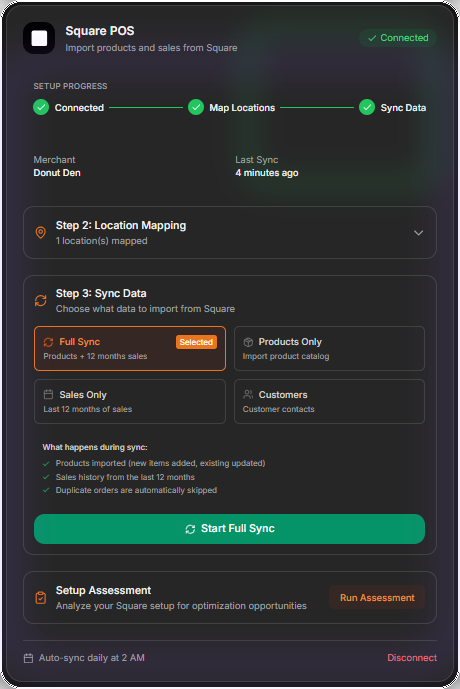
Square POS integration setup in DoughOps — connect, map locations, and sync in minutes
When your production planning system integrates directly with Square, the entire workflow transforms:
1. Automatic Overnight Sales Sync
Every night at 2 AM, the system pulls yesterday's complete sales data. No manual entry. No CSV exports. No logging into Square Dashboard. By the time you wake up, yesterday's transactions are already analyzed and factored into today's recommendations.
2. Product Catalog Sync
When you add a new seasonal item to Square, it automatically appears in your production planning system. Change a product name? It updates everywhere. Discontinue an item? The system knows immediately. Your product lists stay perfectly synchronized without duplicate data entry.
3. Multi-Location Intelligence
Running multiple stores? Square tracks sales by location, and integrated systems maintain separate production plans for each. Your downtown location sells different volumes than your suburban store, and the data reflects those differences automatically.
4. Historical Trend Analysis
With months of precise sales history flowing automatically, AI can spot patterns you'd never notice manually:
- Maple bars sell 23% better on Saturdays than Fridays
- Boston cream donuts have a consistent Thursday spike
- Apple fritters drop 15% in July and August
- Filled donuts outsell cake donuts 3:2 on weekdays but even out on weekends
DoughOps Square Integration: Completely Automatic
Connect your Square account once with a secure OAuth flow. From that moment forward, sales sync automatically every night. Products stay synchronized. Location data flows without re-entering anything. You never think about it again—the data just works.
No API keys to manage. No manual imports. No developer required. Just click "Connect Square" and you're done.
Why Manual Sales Tracking Always Fails
Some shops attempt manual tracking—clipboards by the register, tally marks in notebooks, end-of-day counts written on whiteboards. The intention is good, but execution breaks down:
Human Error
Busy Saturday morning, line out the door, and someone forgets to mark down three glazed donut sales. That data is gone forever. Multiply these small errors across weeks and months, and your records become unreliable.
Time Consumption
Recording sales manually takes time—time that front-of-house staff don't have during rushes and don't remember during slow periods. End-of-day tallying adds 15-30 minutes to closing procedures.
Limited Granularity
Manual tracking usually captures daily totals. "We sold 45 glazed donuts today." But what time did they sell? Which were individual purchases versus dozen boxes? How does today compare to the same day last month? Manual systems rarely capture this detail.
No Trend Analysis
Even if you perfectly record three months of sales, analyzing that data requires spreadsheets, formulas, and time most shop owners don't have. The data exists but remains unusable.
Ready to reduce waste and boost profits?
Book a DoughOps demo to see the workflow in your bakery.
Book a DemoHow Integrated Data Powers Better Predictions
Sales data alone is valuable. But integrated sales data combined with AI prediction becomes transformative:
Day-of-Week Patterns
The system knows exactly how many chocolate cake donuts you sold every Tuesday for the past 12 weeks. Not "about 15" or "usually pretty good"—the exact numbers: 14, 18, 12, 19, 16... Average: 15.8, trending up slightly over the period.
Seasonal Adjustments
Summer sales for apple fritters drop 15%. But the system doesn't just know that—it knows the decline started around June 8th last year, accelerated through July, and reversed in early September. This year, it predicts the pattern before you notice it.
Product Performance Comparison
Which of your five filled donut varieties actually sells best? Your memory says raspberry, but the data shows Boston cream outsells it 2:1. Integrated systems make these insights instantly visible.
Impact of New Products
Launch a new specialty donut and the system immediately tracks performance. After two weeks, it has enough data to recommend baseline production. After four weeks, it's factoring day-of-week patterns. Your gut feeling might take months to calibrate; data does it in days.
Beyond Production: Other Benefits of Integration
While production planning is the primary benefit, POS integration unlocks other advantages:
Real-Time Inventory Visibility
Know what's selling right now. If blueberry cake donuts are moving faster than expected, you can boost mid-day production before running out. No waiting until tomorrow to discover you missed sales.
Profitability Analysis
Combine sales data with ingredient costs and see which products actually drive profit. That $3.50 specialty donut might sell fewer units than $1.50 glazed, but generate better margins. Data makes these insights clear.
Waste Reduction Tracking
Compare what you made versus what you sold with perfect accuracy. Last month, you produced 1,247 glazed donuts and sold 1,104—an 11.5% waste rate. This month, after adjusting baselines, waste dropped to 6.8%. You can prove the improvement with numbers.
Staff Performance Insights
See which products move during different shifts. Maybe morning staff excel at selling coffee pairings while afternoon crew pushes specialty items. Understanding these patterns helps with training and scheduling.
The Setup Process: Simpler Than You Think
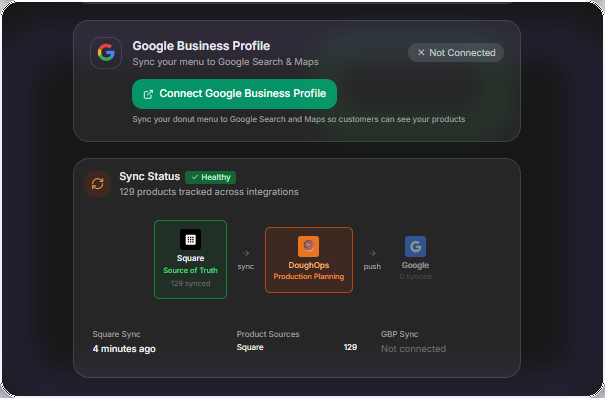
Keep your menu in sync across Square, DoughOps, and Google Business Profile
Shop owners often assume POS integration requires technical expertise or IT support. Modern systems have made it remarkably simple:
- One-click authorization: Click "Connect Square" and log into your Square account
- Grant permissions: Allow read access to sales and products (no payment information)
- Automatic mapping: The system matches Square products to your production planning catalog
- Initial sync: Historical sales data imports (usually 90 days)
- Ongoing automation: Daily syncs happen automatically forever
Total setup time: 5-10 minutes. Technical skill required: Knowing your Square login.
Security and Data Privacy
Connecting systems raises valid security questions. Here's what happens with properly built integrations:
- OAuth authentication: You never share passwords; Square generates secure tokens
- Read-only access: The integration can see sales data but can't modify your Square account
- No payment data: Credit card numbers and customer payment information never transfer
- Revocable permissions: Disconnect anytime from your Square Dashboard
- Encrypted transmission: All data transfers use bank-level encryption
Reputable production planning systems treat your data with the same security standards Square uses—because your business depends on both.
Making the Transition
Moving from manual tracking (or no tracking) to automated POS integration feels like a big change. Here's what the typical adoption journey looks like:
Week 1: Initial skepticism is natural — you'll likely cross-check against your old methods.
Week 2: The data starts matching your expectations, and trust begins to build.
Week 4: Patterns become clear that were invisible before. Production decisions feel more confident.
Week 8: Your daily production plan becomes your single source of truth.
The transition from skepticism to dependence happens fast once you see accurate predictions replacing guesswork.
The Competitive Reality
More donut shops are connecting their POS systems to production planning tools every month. The ones that do gain immediate advantages:
- Less waste means better margins
- Accurate forecasting means fresher product
- Data-driven decisions outperform gut feelings
- Time saved on manual tracking goes toward customer service
The shops still relying on memory and manual counts are competing with businesses operating on precise, real-time data. It's not a fair fight.
Getting Started
If you're already using Square, integration is the single biggest improvement you can make to your production planning. The data already exists—you're just not using it yet.
Modern tools like DoughOps make integration trivial. Connect once, then never think about data entry again. Your sales history automatically becomes the foundation for smarter production decisions.
The question isn't whether to integrate—it's how long you can afford not to.
Ready to reduce waste and increase profits?
DoughOps turns Square sales data into better production, inventory, and daily operating decisions for donut shops. Start free today.
Start FreeRelated Articles

How AI Production Planning Helps Donut Shops Reduce Waste
Discover how artificial intelligence is helping donut shops predict daily demand and eliminate costly overproduction.

Growing Your Wholesale Business: B2B Sales for Donut Shops
Coffee shops, offices, and catering companies need donuts. Learn how to find and convert wholesale customers.
Why Your Donut Shop Needs a POS Partner, Not Another POS
Most bakery software tries to replace your POS. The smarter approach: pair production intelligence with your existing POS system.